Billing
The Billing page lets you manage your GrowPanel subscription, update payment methods, and access invoices. Only the account owner can access billing settings.
Accessing billing
Navigate to Account → Billing to manage your subscription.

Current plan
The billing page shows your current subscription status:
| Field | Description |
|---|---|
| Plan | Your current plan name |
| Status | Active, Trial, Past Due, or Canceled |
| Billing period | Monthly or Annual |
| Next renewal | When your subscription renews |
| Price | Amount charged each period |
Free trial
New GrowPanel accounts start with a 14-day free trial:
- Full access to all features
- No credit card required to start
- Add payment method before trial ends to continue
Trial status
During your trial, you'll see:
- Days remaining in your trial
- Option to add payment method
- Plan selection for immediate upgrade
After trial ends
If you haven't added a payment method:
- We will notify you that your trial is up
- Historical data is preserved, and we will keep sync'ing your latest data
- Select a free (available as long as you're below $200k in ARR) or paid plan to continue.
Managing your subscription
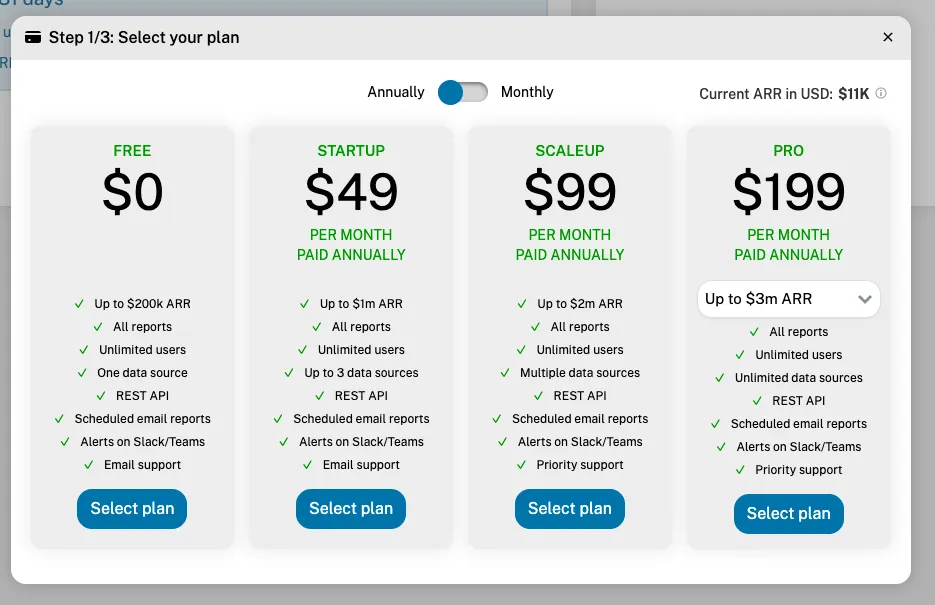
Upgrade or change plan
To change your plan:
- Click Select your plan
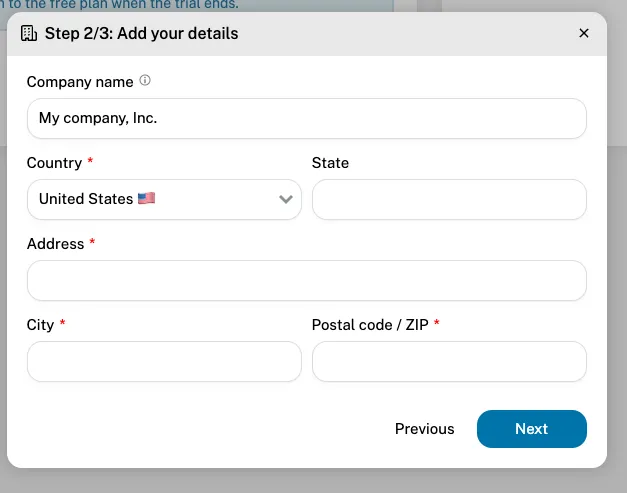
- Enter your company address and VAT number, if applicable
- Review the price summary
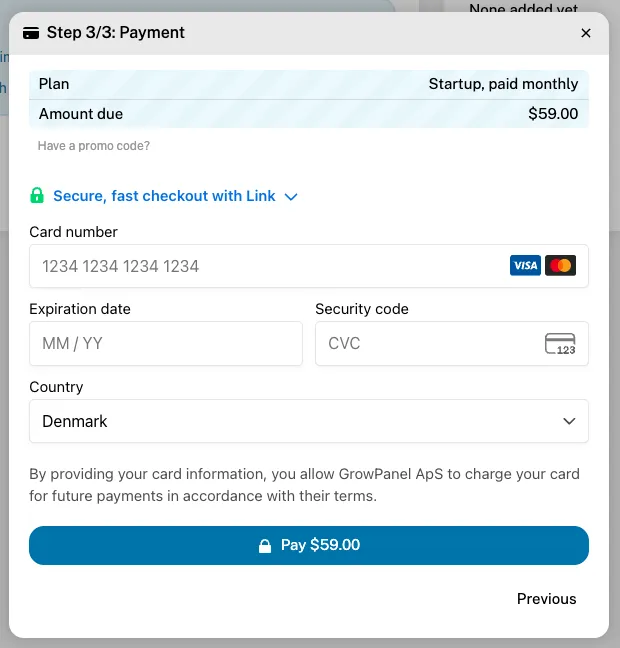
- Confirm the upgrade


Plan changes take effect immediately. For upgrades, you're charged a prorated amount for the remainder of the current period. For downgrades, you stay on your current plan until the end of the paid period.
Switch billing period
To change between monthly and annual billing:
- Click Change Plan
- Select the same plan with different billing period
- Review the new price
- Confirm the change
Annual billing offers a discount compared to monthly.
Cancel subscription
To cancel your GrowPanel subscription:
- Click Cancel Subscription
- Optionally provide feedback on why you're leaving
- Confirm the cancellation
After cancellation:
- Access continues until the end of your paid period
- Data is preserved for 30 days after expiration
- You can resubscribe at any time to restore access
Payment methods
View current payment method
The billing page shows your saved payment method:
- Card type and last 4 digits
- Expiration date
- Billing address
Update payment method
To change your payment method:
- Click Update Payment Method
- Enter new card details
- Click Save
The new payment method will be used for future charges.
Failed payments
If a payment fails:
- You'll receive an email notification
- A banner appears in GrowPanel
- Access continues for a grace period
- Update your payment method to resolve
Invoices
View invoices
All past invoices are listed on the billing page:
| Column | Description |
|---|---|
| Date | Invoice date |
| Amount | Charged amount |
| Status | Paid, Pending, or Failed |
| Actions | View or download PDF |
Download invoices
Click Download next to any invoice to get a PDF for your records or expense reporting.
Invoice details
Each invoice includes:
- GrowPanel billing details
- Your billing address
- Line items and amounts
- Tax information (if applicable)
- Payment method used
Billing FAQ
When am I charged?
You're charged at the start of each billing period:
- Monthly: Same date each month
- Annual: Same date each year
Can I get a refund?
GrowPanel offers a 14-day trial, and both monthly and yearly payments. We don't refund paid periods once they have begun.
Do you offer discounts?
- Annual billing includes a discount over monthly
- Contact sales for volume or startup discounts
What payment methods do you accept?
- All major credit cards (Visa, Mastercard, Amex)
- Debit cards
- Contact us for invoice/wire transfer (annual, enterprise plans only)
How do I update my billing address?
- Click Billing Address on the billing page
- Update your address details
- Click Save
Changes apply to future invoices.
